Glass Widgets Pro
JustNewDesignsPersonalization
4.795.00 Reviews
- Version
- 1.3.008
- Installs
- 50.00K
- Age Rating
- Everyone
Screenshots
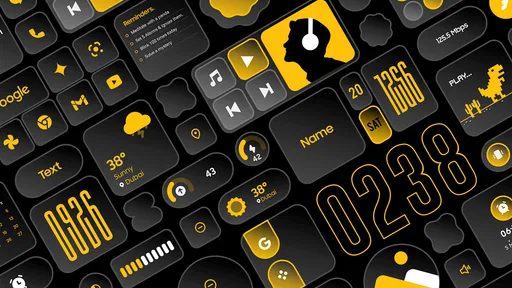
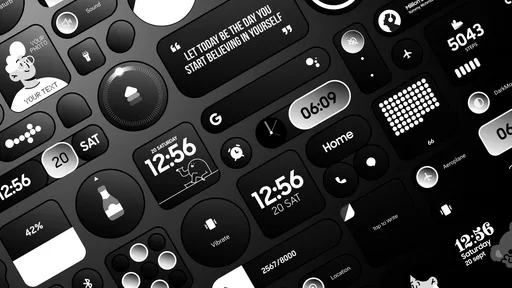
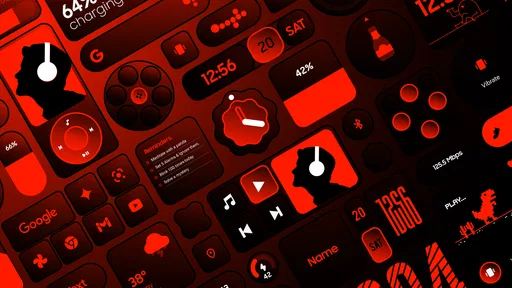
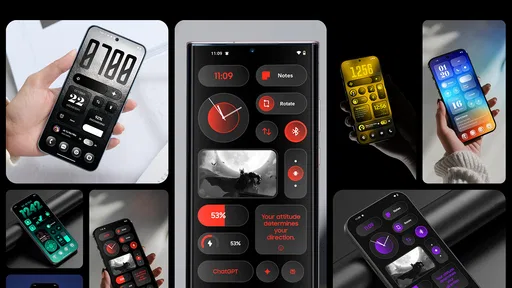
Our Review of Glass Widgets Pro
 Analysis by Appyee
If you’re choosing a home-screen app with a strong visual style, I’d look at both the widgets and the choices the app lets you make around them. Glass Widgets Pro is an Android personalization app from JustNewDesigns, built around a glass-like appearance for everyday information. Its 4.7 average from around 1.6 thousand ratings and more than 50 thousand installs suggest that plenty of Android users have found it worth exploring, though popularity alone doesn’t tell me whether it fits your habits. I’d judge it by a more practical question: can its translucent widgets make your screen easier to use without asking you to give up control or clutter it?
First Impressions
When you first download Glass Widgets Pro, what strikes you is its simplicity. The app doesn't bombard you with complex settings or flashy introductions. Instead, it greets you with a clean interface that's as transparent as its widgets. It's like the app is saying, "Hey, let's get straight to the good stuff." And that's exactly what it does.
A visual style that needs a little planning
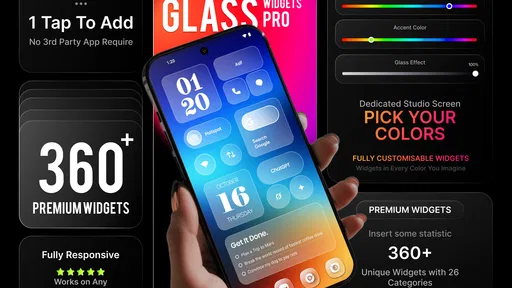
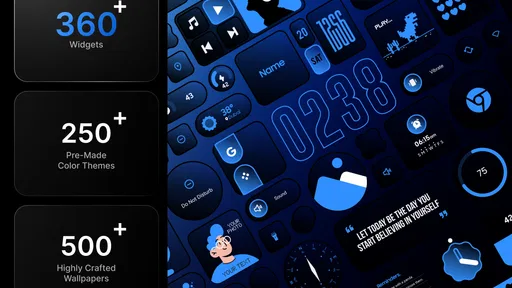
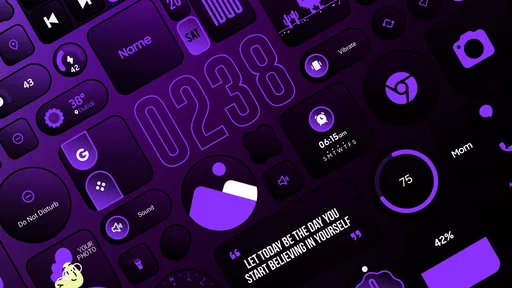
One of the first things I noticed was how customizable the widgets are. You can choose from a variety of styles that all maintain that signature transparent look. Whether it's the weather forecast or your calendar, everything is presented in a way that's both functional and aesthetically pleasing. The transparency allows your wallpaper to shine through, giving your home screen a unique, cohesive look.
I played around with different settings and was pleasantly surprised by how easy it was to align everything just right. If you're a perfectionist about your home screen layout, you'll appreciate the attention to detail.
That flexibility is most useful when you treat the home screen as a layout rather than a collection of isolated decorations. I’d start by choosing a wallpaper with enough contrast behind the information I check most often, then place one or two widgets before filling empty spaces. Transparent styling can look elegant, but text may be harder to scan if a busy image sits directly underneath it. A simpler wallpaper, or a less crowded area of the same wallpaper, can make the same design more practical.
A useful test is to check the screen in the places where you actually use your phone: bright outdoor light, a dim room, and a quick glance while moving between tasks. If the glass effect looks good but makes the details hard to read, the visual win is not worth the daily friction. I’d favor a layout that keeps the most important information legible over one that makes every widget match perfectly.
Useful information without turning the screen into a dashboard
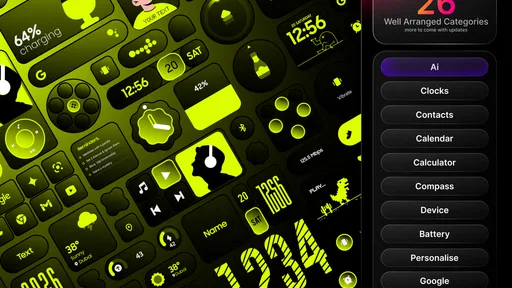
Of course, looks aren't everything. A widget app needs to deliver on functionality, and Glass Widgets Pro does just that. The app covers all the basics with weather updates, clock, calendar, and even a news feed. But what really sets it apart is the ability to customize how much information you want to see. It's like the app knows that sometimes less is more.
The weather widget, for instance, gives you the flexibility to choose between a detailed forecast or just the essentials. Want to know if you need an umbrella without being bombarded by humidity levels and barometric pressure? No problem!
The ease of customization is where it truly shines.
For a more focused setup, I’d use the clock as a quick-glance anchor and add only the information that saves me an extra tap. A compact weather view can answer “coat or no coat?” before leaving home, while a calendar view can help me catch the next commitment without opening a separate app. The trade-off is that each additional block competes for space and attention. If I already rely on another calendar or news app, I’d avoid placing duplicate information on the home screen just because the option exists.
That makes the app a better fit for people who enjoy tuning their Android layout than for anyone who wants a ready-made screen that never needs attention. The best setup is not necessarily the one with the most widgets; it is the one that puts a few useful details where your thumb and eyes naturally go. I’d make one change at a time, use the phone normally for a day, and remove anything I keep ignoring.
Trust, permissions, and the moments that deserve attention
A weather or news widget can feel personal because it brings changing information onto a screen you see throughout the day. I think it’s sensible to pause at the point where Android asks for a permission or where the app presents a choice about access. Read the wording on the device and decide whether the request makes sense for the feature you are trying to use. I wouldn’t treat a polished appearance as proof of any particular data practice, and I wouldn’t grant access automatically just to finish setup quickly.
The same caution applies when deciding what to display in public. A calendar widget can make a schedule convenient to check, but a home screen may be visible to someone beside you. Before adding personal details, consider whether a minimal view would do the job just as well. That is a practical privacy choice you can make through your layout, even without changing how you use your calendar elsewhere.
I also recommend checking the Android app’s visible permission controls if you later stop using a feature. You can review access in your device settings and adjust what the operating system allows. That is different from knowing how an app handles information internally, so I wouldn’t make assumptions beyond the controls you can actually see. My approach is simple: use only the features I want, pay attention to permission prompts, and revisit access if my use changes.
Everyday reliability and sensible expectations
In terms of performance, I found the app to be incredibly smooth. There were no noticeable lags or glitches, which is a big plus in my book. Nobody wants a widget app that slows down their phone, right? The developers have clearly put in the work to ensure that the app runs seamlessly.
The user interface is intuitive, which means you won't be wasting time trying to figure out how to tweak settings. Everything is laid out in a logical manner, making navigation a breeze.
A realistic use case is a weekday morning: I could glance at the time, check the weather before heading out, and see what is coming up without opening several apps. That convenience depends on the widget showing the information I need clearly and on my Android home screen giving it enough room. If I find myself opening the full weather or calendar app every time anyway, I’d shrink the setup rather than keep extra panels out of habit.
As with other Android widgets, I’d also leave room for normal device differences. Home-screen launchers can arrange and resize widgets in different ways, and the available space depends on the device’s screen and layout. If something looks cramped, I’d try a different size or position before concluding that the design itself is a poor fit. The app is intended for Android, so it is not the right choice if you need the same widget setup on an iPhone.
Who will enjoy it, and when another option makes more sense
Compared with the usual alternatives in personalization, this app’s main appeal is its coordinated translucent look combined with a choice of widget presentations. A built-in launcher widget or a basic clock-and-weather panel may be quicker if you only want essential information and do not care about matching the wallpaper. A more general widget toolkit may suit someone who wants to build a highly specific layout from scratch. I’d choose Glass Widgets Pro when I want a distinctive glass effect and prefer adjusting ready-made widget styles over assembling every detail myself.
It is especially appealing if you already enjoy changing wallpapers, icons, and screen spacing, and if you’re happy to spend a little time checking readability. It is less compelling for someone who prefers a plain, high-contrast interface, rarely looks at home-screen widgets, or expects a personalization app to improve the underlying features of their calendar or weather service. Its role is presentation and quick access, not a replacement for the apps that supply the information.
If you’re wondering whether it is suitable for a family device or a first Android phone, I’d base that choice on the person’s comfort with customization rather than on the visual effect alone. The content rating is Everyone, but an easy-to-use screen still depends on selecting a layout that the owner can read and understand. Someone who wants a fixed, familiar arrangement may be happier with the phone’s default widgets; someone who likes choosing how information appears may enjoy the extra control here.
Price, version, and the choice to buy
Now, let's talk about the price. Glass Widgets Pro isn't free, but considering the level of customization and the sleek design, it's definitely worth the few bucks. It's a small price to pay for transforming your home screen into something that looks like it belongs on a tech blog's Instagram page.
Plus, you're supporting developers who are clearly passionate about what they do. That's always a win in my book.
The app costs $0.99, so I’d decide based on whether I expect to keep using the widgets rather than on the low price alone. If I only want to experiment with a new look for a day, paying for a dedicated personalization app may not be worthwhile. If I regularly check the home screen and value having weather, time, or calendar details arranged to my taste, the cost is easier to justify. The current version is 1.3.008, and the app was released on October 7, 2025; it requires Android 12 or later, so checking that requirement before buying can prevent an avoidable mismatch.
There are also 95 written reviews alongside the average rating. I’d treat those as useful context rather than a guarantee that the app will behave identically on every phone. The most relevant question for me is whether the widgets I want fit my screen and whether the translucent treatment stays readable with my wallpaper. A little planning before purchase can save more annoyance than choosing based on a score alone.
Final Thoughts
All in all, Glass Widgets Pro is a fantastic choice for anyone looking to add a touch of elegance to their Android home screen. It's easy to use, offers great customization options, and doesn't skimp on performance. Whether you're a customization newbie or a seasoned pro, this app has something to offer.
So, if you’re ready to take your widgets from drab to fab, give Glass Widgets Pro a try. It might just be the upgrade your home screen has been waiting for.
My cautious recommendation is to approach it as a visual tool with practical benefits, not as a must-have utility. Start with a small arrangement, keep the information you genuinely check, and pay attention to Android’s permission choices instead of assuming that a clean design tells you everything about data handling. If the glass styling makes your screen pleasant and the widgets earn their space in your routine, it can be a satisfying purchase. If readability, a minimal interface, or cross-platform use matters more, your phone’s standard widgets may serve you better.
Verdict
Strengths of Glass Widgets Pro
- Highly customizable widget options.
- Smooth integration with home screens.
- Minimalist design with rich features.
- Supports multiple languages.
- Regular updates and improvements.
Limitations of Glass Widgets Pro
- Limited free features available.
- May consume more battery on old devices.
- Initial setup can be a bit complex.
- No built-in tutorial for beginners.
- Requires manual configuration for themes.
Other Releases by JustNewDesigns
View All
Depth Wallpapers & Live Clock
Personalization4.5

LineX Icon Pack
Personalization4.5

Everything Widgets
Personalization4.6

LineX White Icon Pack
Personalization4.5
Similar Picks in This Category
View All
Microsoft SwiftKey AI Keyboard
SwiftKey4.3

Wallpapers
Google LLC4.1

Zedge™ Wallpapers & Ringtones
Zedge4.7

Yandex Browser with Alice AI
Direct Cursus Computer Systems Trading LLC4.3

Ringtone Maker:create ringtone
Big Bang Inc.4.7

Fonts Keyboard
Fonts Keyboard3.9
Frequently Asked Questions
What is Glass Widgets Pro and how does it enhance my device experience?
Glass Widgets Pro is an Android app that offers customizable widgets to enhance your home screen's aesthetic and functionality. The app provides a sleek, transparent look for widgets such as weather, calendar, and news. Users can personalize these widgets to integrate seamlessly with their device's theme, providing both style and convenience.
Is Glass Widgets Pro compatible with all Android devices?
Glass Widgets Pro is designed to be compatible with most Android devices running Android 4.1 and above. However, certain features may vary depending on the device's screen size and resolution. It’s always a good idea to check the app's compatibility with your specific device before downloading.
Does Glass Widgets Pro consume a lot of battery life?
Glass Widgets Pro is optimized to minimize battery consumption. While any widget that updates regularly, like a weather or news widget, will use some battery, Glass Widgets Pro is designed to ensure that this usage is efficient. Users can also customize update intervals to further manage battery usage effectively.
Can I customize the appearance of the widgets in Glass Widgets Pro?
Yes, Glass Widgets Pro offers extensive customization options. Users can adjust the size, color, transparency, and font of the widgets. This flexibility allows you to tailor the widgets to match your personal style and the overall theme of your device, making your home screen uniquely yours.
Are there any in-app purchases or subscriptions in Glass Widgets Pro?
Glass Widgets Pro is a paid app, meaning users need to purchase it upfront. Once purchased, all features are fully accessible without any additional in-app purchases or subscriptions. This one-time payment model ensures that users can enjoy all functionalities without recurring costs.
